
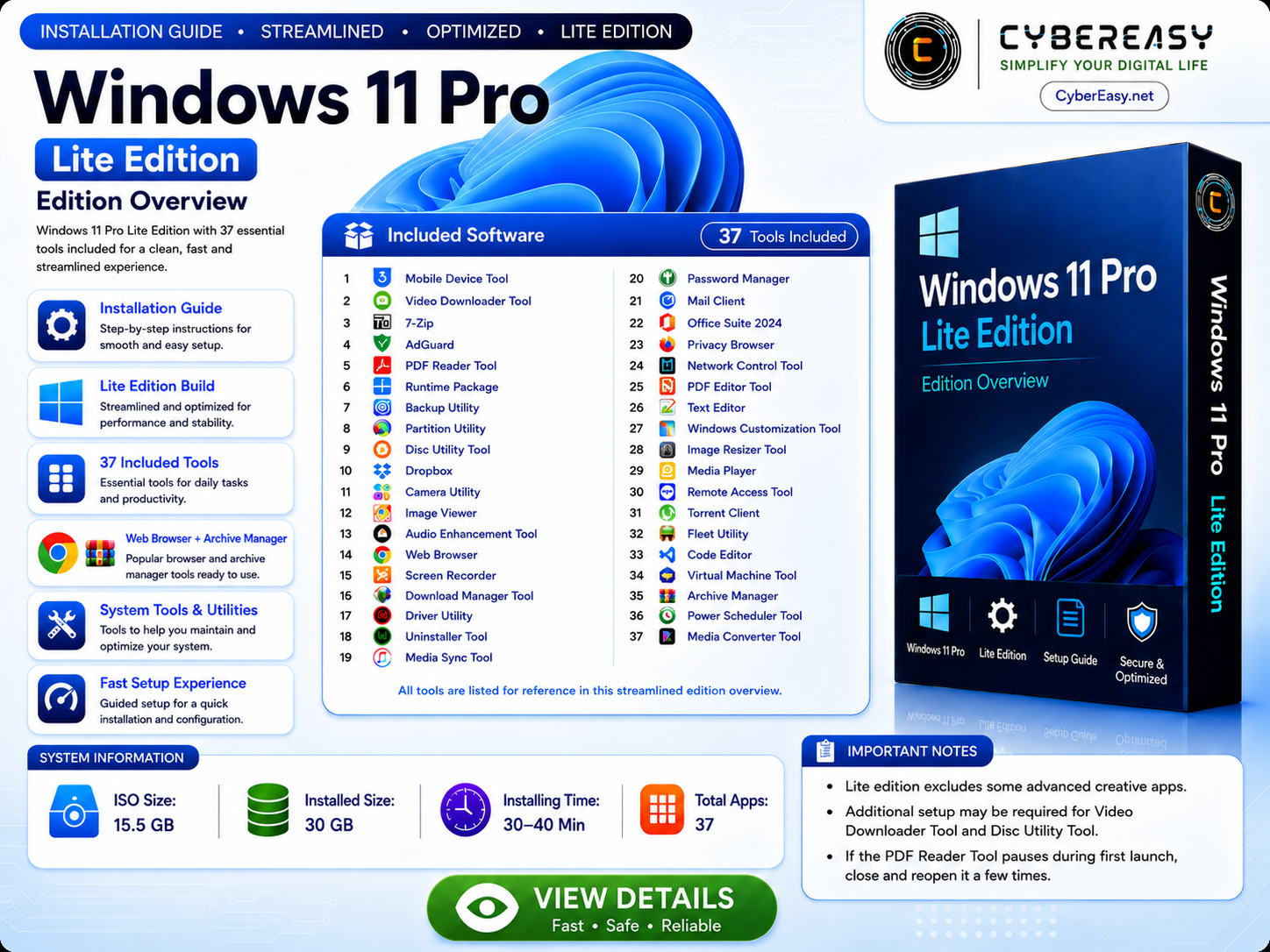
Windows 11 Pro Lite Edition is presented by CyberEasy as a clean setup guide and system overview for users who want a lightweight, simple, and organized Windows experience. This page explains the main features, system information, listed tools, and setup notes in a safe and easy-to-understand format.
The Lite Edition is designed for users who prefer a streamlined Windows environment for personal computers, office workstations, technician use, lab setup, and everyday productivity. It focuses on speed, simplicity, clean interface, and useful system tools while keeping the overall experience easy for regular users.
Windows 11 Pro Lite Edition Overview
This overview highlights the core information about Windows 11 Pro Lite Edition, including system size, installation notes, listed applications, and general usage guidance. The purpose of this page is to help users understand what is included, how the setup experience works, and what type of users may benefit from a lighter Windows environment.
Main Features
- Clean and lightweight Windows experience
- Simple setup guidance for personal and office use
- Included productivity and utility tools
- Optimized interface for faster daily work
- Useful system utilities for maintenance and organization
- Helpful browser, archive, media, and document tools
Included Software Information
The package includes a collection of useful applications for browsing, file management, media playback, document handling, system monitoring, archive management, and everyday productivity. Some applications may be free, while some paid applications may require a valid license, official account, or subscription from the original developer.
Users should always follow the official license terms of each software developer. CyberEasy recommends using genuine software sources, official accounts, and valid licenses where required. This keeps the system safer, more reliable, and suitable for long-term use.
Who Is This Guide For?
This Windows 11 Pro Lite Edition guide is useful for users who want a simple Windows setup overview before preparing a PC. It can be helpful for home users, office users, students, technicians, and people who prefer a clean system with commonly used software tools listed in one place.
Setup Notes
Before setting up any Windows system, users should back up important files, check hardware compatibility, keep device drivers ready, and make sure the computer meets the required specifications. A stable internet connection is also recommended for updates, account sign-in, and software verification where needed.
For official Windows information and system requirements, users can visit the official Windows 11 page. You can also explore more software guides from our CyberEasy Software section.
Final Words
Windows 11 Pro Lite Edition is best presented as a clean overview and setup guide for users who want a faster, simpler, and more organized Windows experience. This page provides general information, listed tool details, and safe setup guidance so users can understand the edition before using it on their device.
Windows 11 Pro Lite Edition is presented as a clean, fast, and streamlined Windows setup overview. It lists essential software categories for everyday use while keeping the build more lightweight and optimized.
This Lite Edition is useful for personal PCs, office computers, technicians, lab setup, and users who want a simpler Windows setup with included essential tools.
Main Features
- Windows 11 Pro Lite Edition setup overview
- Guided Windows setup workflow
- Lite and optimized build for performance
- 37 listed essential tools
- Web browser and archive tools listed
- System tools and utilities listed
- Guided setup experience
- Secure and optimized workflow
System Information
- Package Reference: Large setup package
- Estimated Installed Size: Around 30 GB
- Estimated Setup Time: 30–40 Min
- Total Listed Tools: 37
- Edition: Windows 11 Pro Lite Edition
- Build Type: Windows Setup Overview
Included Software List
- 3uTools
- Video Downloader Tool
- 7-Zip
- AdGuard
- PDF Reader Tool
- All in One Runtime C++
- Backup Utility
- Partition Utility
- Disc Utility Tool
- Dropbox
- EZVIZ Studio
- FastStone Image Viewer
- Audio Enhancement Tool
- Google Chrome
- Icecream Screen Recorder
- Download Manager Tool
- Driver Utility
- Uninstaller Tool
- iTunes 64-bit
- KeePassXC
- Mailbird
- Office Suite 2024
- Mozilla Firefox
- NetLimiter
- PDF Editor Tool
- Notepad++
- NTLite
- PIXresizer
- PotPlayer
- TeamViewer
- Torrent Client
- Vehicle Manager
- Visual Studio Code
- Virtual Machine Tool
- Archive Manager
- Power Scheduler Tool
- Media Converter Tool
Installation Guide
- Bootable USB: Use Rufus or Ventoy to create a bootable USB drive (GPT).
- Boot Menu: Boot from USB, select your drive carefully, and follow standard Windows setup steps.
- Setup: Windows and listed tools are prepared for a guided setup experience.
- License: Windows activation requires internet and a valid license. Review official license information and setup notes, then do a final restart if required.
Important Notes
- Lite Edition: This edition excludes some advanced creative apps.
- PDF Reader Tool: If PDF Reader Tool gets stuck on fetching screen, run and close it 3 times. It should work on the 4th time.
- Video Downloader Tool / Disc Utility Tool: Review license and setup notes from official or authorized sources. Use valid license information where required.
- Recommendation: For smooth creative and document-tool performance on high-end SSD PCs: i5 CPU, 8GB RAM, SSD storage, and 2GB GPU (optional).
Windows 11 Pro Lite Edition Information
Note: This Windows setup overview is intended for experienced users, technicians, and clean deployment workflows. Always backup your data before installing Windows and use valid licenses where required.