
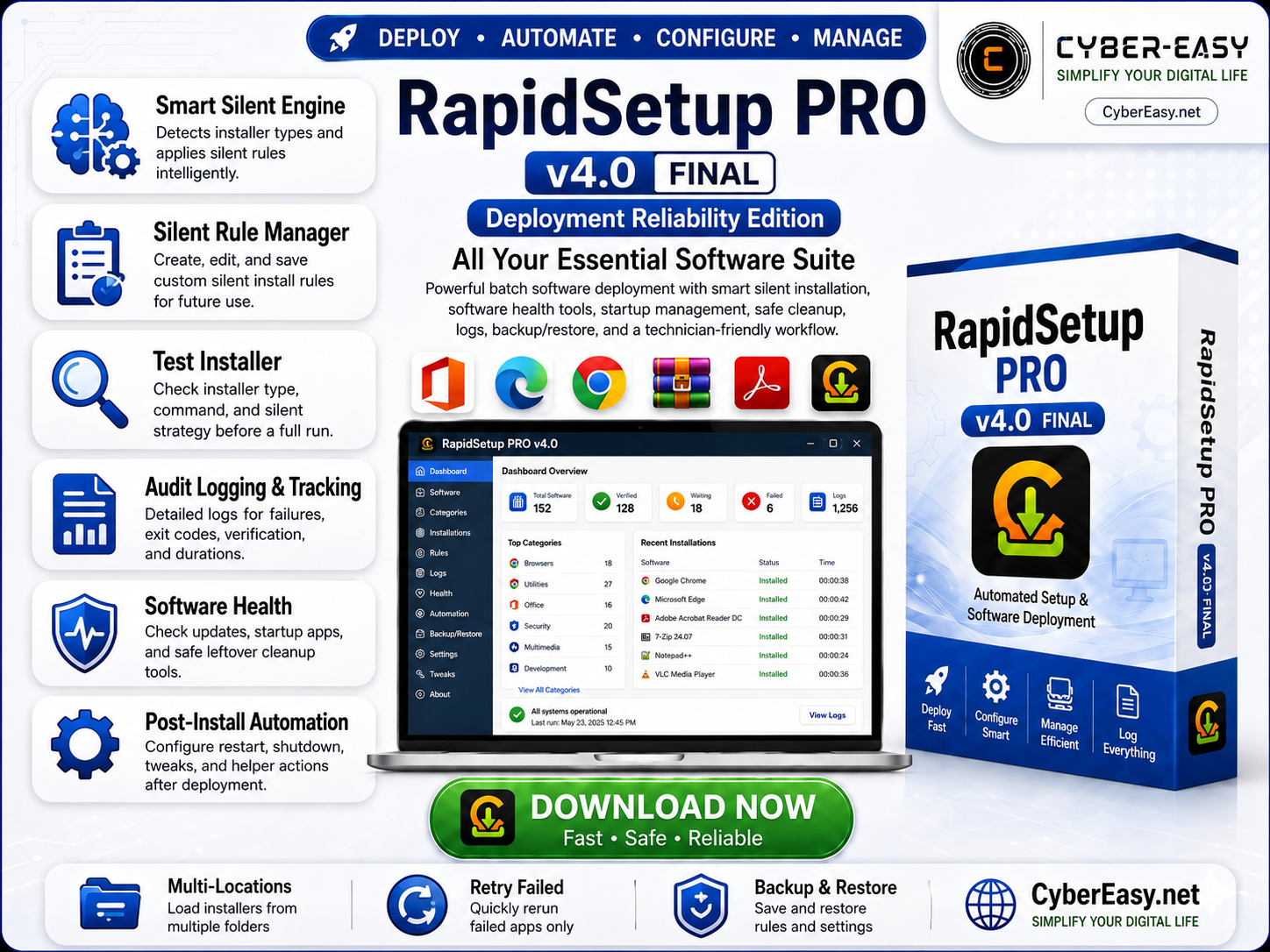
RapidSetup PRO v4.0 is a Windows software deployment and post-installation automation utility developed for technicians, PC builders, IT support workflows, computer shops, labs, and users who regularly configure Windows systems.
The application combines batch EXE/MSI installation, intelligent silent-install detection, custom silent rules, installation verification, software health tools, startup management, software updates, safe leftover review, installation logs, multiple software locations, and backup/restore features in one organized interface.
RapidSetup PRO v4.0 for Windows
RapidSetup PRO is designed to reduce repetitive work after installing or reinstalling Windows. Instead of opening installers one by one, users can load software collections, organize applications by category, select the required programs, and run a managed deployment queue from one dashboard.
Main Features
- Batch EXE/MSI Installation: Load and install multiple Windows applications from one interface.
- Smart Silent Engine: Detects supported installer types and automatically applies appropriate silent-install strategies.
- Silent Rule Manager: Create, edit, enable, disable, and permanently save custom silent-install rules for individual applications.
- Test Installer: Check the detected installer type, command, silent strategy, arguments, and working folder before running a full deployment.
- Multiple Software Locations: Save and scan several software folders without replacing previously configured locations.
- Software Categories: Automatically groups applications into Browser, Internet, Office, PDF, Editor, Media, Archive, Driver, Utility, Security, Gaming, and other categories.
- Installation Verification: Distinguishes between an installer that completed successfully and software that can also be verified through Windows installation records.
- Retry Failed Apps: Quickly retry only the applications that failed during a previous installation queue.
- Stop After Current & Resume Queue: Safely stop a deployment after the active installer finishes and continue remaining applications later.
- Installation Audit Logs: Records installer commands, arguments, exit codes, duration, verification results, working directories, and failed-app information.
- Software Health: Check WinGet-managed updates, startup applications, and potential uninstall leftovers from one dashboard.
- Startup Manager: Review startup applications and manage supported startup entries directly from RapidSetup PRO.
- Safe Leftover Cleaner: Reviews potential leftover files and uninstall records before cleanup instead of deleting items automatically.
- Smart Uninstaller: Provides an organized view of installed desktop applications and Windows apps.
- Backup & Restore: Save RapidSetup configuration, software locations, preferences, and personal silent rules for future use.
- Windows Tweaks: Includes optional technician tools for Windows configuration and post-install actions.
What’s New in RapidSetup PRO v4.0
- New Smart Silent installer detection system
- Persistent Silent Rule Manager
- Installer testing before deployment
- Improved installation verification
- Better failed-app diagnostics and logging
- Retry Failed Apps workflow
- Stop After Current and Resume Queue support
- Multiple saved Software Locations
- Software Health dashboard
- WinGet software-update checking
- Startup Manager with enabled/disabled status
- Safe uninstall-leftover review
- Configuration Backup & Restore
- Improved handling for large and package-based installers
Smart Silent Installation
RapidSetup PRO v4.0 includes a Smart Silent Engine designed to work with both already-unattended software packages and standard Windows installers.
- MSI packages: Uses unattended Windows Installer options when appropriate.
- Supported installer engines: RapidSetup can identify known installer formats and select an appropriate silent strategy.
- Already-silent installers: Existing unattended or CyberEasy packages can run without unnecessary additional switches.
- Custom applications: Users can create a persistent rule when a particular installer requires a special argument.
- User rules override built-in detection: This allows a known working rule to be reused with future versions of the same application.
Understanding Installation Status
- Ready: The installer is loaded and waiting for deployment.
- Pending: The application is included in the current installation queue.
- Installing: RapidSetup is currently running the installer.
- Done: The installer returned a successful completion result.
- Verified: Installation completed successfully and RapidSetup also found a matching installed application in Windows.
- Failed: The installer returned an error or could not be executed successfully. Detailed information is stored in the installation report.
Installation & Usage Guide
- Install RapidSetup: Run the RapidSetup PRO setup package and complete installation.
- Add Software: Use Add Files, Add Folder, or the Software Locations Manager to load your installer collection.
- Select Applications: Check the programs you want to install.
- Test When Needed: Use Test Installer if an application requires a special silent setup method.
- Silent Rules: Create a custom Silent Rule only when the automatic strategy does not work correctly.
- Start Deployment: Click Install and monitor status, progress, elapsed time, and failures.
- Review Results: Use the installation log and Failed Apps report to troubleshoot any unsuccessful applications.
- Retry: Use Retry Failed instead of repeating the entire installation queue.
- Backup Configuration: Save your RapidSetup configuration after setting up software locations and silent rules.
Silent Rule Manager Guide
- Use Selected App: Automatically fills rule information from the currently selected installer.
- Filename Contains: Recommended for applications whose filenames contain changing version numbers.
- Match Text: Use a stable name such as
3utools,iobit driver, orezviz. - Silent Arguments: Enter only the argument required by that installer. Leave this blank when the package is already unattended.
- Save Rule: Stores the rule permanently for future RapidSetup sessions.
- Rule Enabled: Temporarily disable a rule without deleting it.
Tip: Do not create rules for every installer. Allow Smart Silent detection to handle applications automatically and create custom rules only when required.
Software Health & Maintenance
- Software Updates: Checks applications that can be managed through Windows Package Manager (WinGet).
- Startup Apps: Shows detected startup applications and their enabled or disabled status.
- Uninstall Leftovers: Reviews conservative leftover candidates before cleanup.
- Safe Cleanup: Cleanup actions require user review instead of automatically removing detected items.
Note: A result of 0 outdated software means WinGet did not report an available update for applications it currently recognizes. It does not necessarily mean every manually installed or portable application on the PC is the latest version.
Installation Logs & Troubleshooting
Every installation session can generate detailed records to make failed deployments easier to troubleshoot.
- Application name and installer path
- Detected installer type
- Silent strategy used
- Command and arguments
- Working directory
- Exit code
- Verification result
- Installation duration
- Error information when available
- Failed-app-only report
Download RapidSetup PRO v4.0
Who Is RapidSetup PRO For?
- Computer technicians
- IT support teams
- PC repair shops
- Windows deployment technicians
- Computer labs
- System builders
- Advanced Windows users
- Users who regularly reinstall or configure multiple PCs
Related CyberEasy Guides

Note: RapidSetup PRO is designed to simplify software deployment and Windows post-installation workflows. Installer compatibility and silent-install options depend on the individual software package. Use trusted installer sources, respect software license terms, and review installation logs when troubleshooting failed applications.